qCHeff: GPU-accelerated effective Hamiltonian calculator
\(\text{qCH}_\text{eff}\) is a GPU-accelerated effective Hamiltonian calculator!
Early Development
\(\text{qCH}_\text{eff}\) is still very early in development. Breaking changes should be expected.
Getting Started
Here’s a quick example of how to use the package.
Installation
\(\text{qCH}_\text{eff}\) be installed using pip:
pip install qcheff
Detailed installation instruction are provided here. CuPy is required in order to use the GPU for computations.
Usage
Operators in \(\text{qCH}_\text{eff}\)
We provide easy access to some operators commonly-used in quantum physics simulations: eye(), create(), destroy(), number(), identity(), basis(), projector(), charge(), position(), momentum(), sigmax(), sigmay(), sigmaz(), sigmap(), sigmam(). Please refer to the operators documentation for more details. For example, eye() creates an identity operator:
from qcheff.operators import eye

eye_op_cpu = eye(3)
eye_op_cpu
<Compressed Sparse Row sparse matrix of dtype 'complex128'
	with 3 stored elements and shape (3, 3)>
By default, operators are created as sparse matrices on the CPU. We can also create operators on the GPU and use dense operators on either device.
Backend options can be set globally using the qcheff_config object. We can list the default parameters for the default config by printing it out.
qcheff_config
QCHeffConfig:
	backend=cpu,
	sparse=True,
	debug=False,
	default_dtype=<class 'numpy.complex128'>
Backend options can be changed locally or for a single object using the temp_config() context manager. Below we create both a sparse and dense identity operator on the GPU.
with temp_config(backend="gpu"):
    eye_op_gpu = eye(3)

eye_op_gpu
<cupyx.scipy.sparse._csr.csr_matrix at 0x7bb86636b230>
with temp_config(backend="gpu", sparse=False):
    eye_op_gpu_dense = eye(3)

eye_op_gpu_dense
array([[1.+0.j, 0.+0.j, 0.+0.j],
       [0.+0.j, 1.+0.j, 0.+0.j],
       [0.+0.j, 0.+0.j, 1.+0.j]])
Creating operators from Numpy/CuPy arrays or Qobj.
To convert Numpy/CuPy arrays into a form that works with \(\text{qCH}_\text{eff}\), we can directly create either a SparseOperator or DenseOperator, which will automatically use the correct backend.
from qcheff.operators import SparseOperator, DenseOperator
cp_eye = cp.eye(4)
DenseOperator(cp_eye)
DenseOperator(op=array([[1., 0., 0., 0.],
       [0., 1., 0., 0.],
       [0., 0., 1., 0.],
       [0., 0., 0., 1.]]), backend_module=<module 'cupy' from '/home/abhis/Documents/qCHeff/.venv/lib/python3.13/site-packages/cupy/__init__.py'>)
QuTiP’s Qobj can also be converted to either format by passing the underlying data array to SparseOperator or DenseOperator.
DenseOperator(qt.qeye(3)[:])
DenseOperator(op=array([[1.+0.j, 0.+0.j, 0.+0.j],
       [0.+0.j, 1.+0.j, 0.+0.j],
       [0.+0.j, 0.+0.j, 1.+0.j]]), backend_module=<module 'numpy' from '/home/abhis/Documents/qCHeff/.venv/lib/python3.13/site-packages/numpy/__init__.py'>)
These operators can then be used as inputs to methods specified in \(\text{qCH}_\text{eff}\).
Iterative Schrieffer-Wolff Transformation (ISWT)
We provide a numerical implementation of NPAD. If the structure and symmetries of the Hilbert space are known to be block-diagonalizable, NPAD can efficiently calculate a specific subset of eigenvalues without resorting to full numerical diagonalization.
Let us consider an example of two coupled Kerr oscillators. We will create a test system using scqubits, with the Hamiltonian \(H=H_0 + V\), where
import scqubits as scq


q1 = scq.KerrOscillator(E_osc=10.0, K=5.3, truncated_dim=3)
q2 = scq.KerrOscillator(E_osc=12.3, K=3.7, truncated_dim=3)

hs = scq.HilbertSpace([q1, q2])
hs.add_interaction(
    g=0.5,
    op1=q1.creation_operator,
    op2=q2.annihilation_operator,
    add_hc=True,
)
SyntaxWarning: invalid escape sequence '\p'
 /home/abhis/Documents/qCHeff/.venv/lib/python3.13/site-packages/scqubits/core/zeropi.py: 284
ham = hs.hamiltonian()
ham
Quantum object: dims=[[3, 3], [3, 3]], shape=(9, 9), type=’oper’, dtype=CSR, isherm=True
Let’s now use NPAD to eliminate the smallest coupling. We can do this after initializing the NPAD object and then using the eliminate_coupling() method. This method will perform a Givens rotation in the specified two-level subspace. We can see below that the coupling has been eliminated and the energies of the coupled level (on the diagonal) are changed.
from qcheff.iswt import NPAD

# Instantiate the NPAD object
zz_npad = NPAD(DenseOperator(ham[:]))

# Eliminate one coupling
zz_npad.eliminate_coupling(1, 3)
qt.Qobj(zz_npad.H.op.toarray())
Quantum object: dims=[[9], [9]], shape=(9, 9), type=’oper’, dtype=Dense, isherm=True
Time evolution using the Magnus expansion
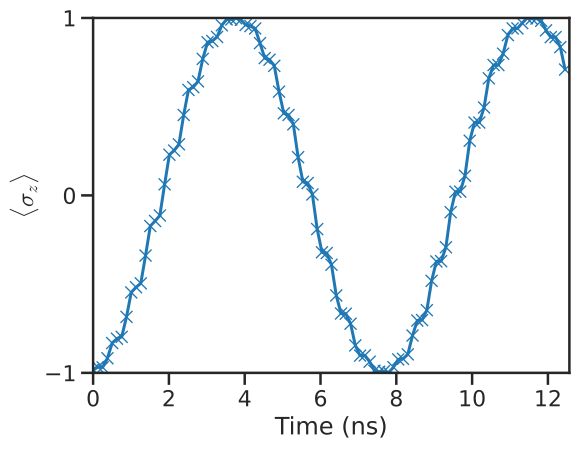
We provide a direct first-order Magnus series-based time evolution in \(\text{qCH}_\text{eff}\). We can use this method to simulate time-evolution for quantum systems
Below we show how to use our Magnus-based time evolution for a single resonantly-driven spin. This system is described by the Hamiltonian
The first term is called the drift Hamiltonian and the second term is the control/drive Hamiltonian. \(\Omega(t)\) is the control pulse, modulatated at the qubit frequency \(\omega\). For simplicity, we assume a flat-top pulse.
from qcheff.operators import sigmaz, sigmax, basis

# Qubit frequency
omega = 2 * np.pi * 1
drift_ham = DenseOperator(0.5 * omega * sigmaz())
control_hams = [DenseOperator(sigmax())]

# Initial State
psi0 = DenseOperator(np.array([0, 1]))

# Time list for creating the control signal
tlist = np.linspace(0, 2 * np.pi * 2, 1000)
control_sigs = 0.85 * np.cos(omega * tlist)
from qcheff.magnus import magnus

# Magnus object
spin_magnus = magnus(tlist, drift_ham, control_sigs, control_hams)
This returns a MagnusTimeEvolDense object. We can call the .evolve() method specifying how many Magnus intervals we want to use for the integration.
# time-evolved states (returned as generator)
states = spin_magnus.evolve(init_state=psi0, num_intervals=100)

# Sigma Z expectation values.
popz = [qt.expect(qt.sigmaz(), qt.Qobj(state)) for state in states]
with (
    sns.plotting_context("talk"),
    sns.axes_style("ticks"),
    matplotlib.rc_context({"mathtext.fontset": "cm"}),
):
    fig, ax = plt.subplots()

    ax.plot(tlist[::10], popz, "x-")
    ax.yaxis.set_major_locator(matplotlib.ticker.MaxNLocator(3, integer=True))
    ax.set(
        ylim=(-1, 1),
        ylabel=r"$\langle \sigma_z\rangle$",
        xlabel="Time (ns)",
        xlim=tlist[[0, -1]],
    )
Contributing
We use the permissive MIT license. Pull requests are welcome. For major changes, please open a GitHub issue first to discuss what you would like to change. Please make sure to update tests as appropriate. More developer documentation is available here.
Citing \(\text{qCH}_\text{eff}\)
If you use \(\text{qCH}_\text{eff}\) in your work, please cite our paper:
@article{qcheff2025,
      title={GPU-accelerated Effective Hamiltonian Calculator},
      author={Abhishek Chakraborty and Taylor L. Patti and Brucek Khailany and Andrew N. Jordan and Anima Anandkumar},
      year={2025},
      eprint={2411.09982},
      archivePrefix={arXiv},
      primaryClass={quant-ph},
      url={https://arxiv.org/abs/2411.09982},
}